Why This Could Save Your Life: Unlocking Quantum Computing Potential

Key Takeaways

  • Quantum computers process information in parallel, allowing them to solve complex problems exponentially faster than classical computers.
  • Potential applications include drug discovery, materials science, artificial intelligence, cryptography, and optimization problems.
  • Challenges include qubit stability, error correction, and achieving quantum supremacy.
  • A career in quantum computing requires a strong foundation in physics, computer science, or engineering, but self-learning and practical experience are also valuable.
  • To stay ahead in the field, continuous learning, hands-on experience, networking, embracing remote work, and financial planning are essential.

AI-generated image. Wait, aren’t quantum physics and computing the same thing? Yes, but no, they’re not.

Quantum Leap: Navigating the Future of Computing

In a world where technology evolves at lightning speed, and I do mean lightning speed. Like, if you blink you just might break your neck. Quantum computing stands out as a revolutionary force poised to transform industries from medicine to finance. But, like anything and most things in life, what exactly is it, and why should you care?

Understanding the Quantum Leap

If you don’t like traffic, feel free to stop reading and leave. However, if you’re a part of the weird percent of the population, I have an exercise for you. Picture a traditional computer as a single-lane road where cars (data) can only move one at a time. Now, imagine a quantum computer as a multi-lane highway, with cars able to take multiple paths simultaneously. This ability to process information in parallel allows quantum computers to solve complex problems exponentially faster than classical computers. So, this is like if we’re more proactive with our infrastructure. Less traffic, less problems.

The Potential of Quantum Computing

The applications of quantum computing are vast and far-reaching, also, I have to admit they are concerning at first glance:

  • Drug Discovery: Accelerating the development of new drugs by simulating complex molecular interactions.
  • Materials Science: Designing innovative materials with superior properties, such as stronger, lighter, or more efficient materials.
  • Artificial Intelligence: Enhancing machine learning algorithms for more intelligent and efficient AI systems.
  • Cryptography: Breaking current encryption methods and developing new, unbreakable ones.
  • Optimization Problems: Solving complex optimization problems, such as logistics and financial modeling.

AI-generated image. A true computer geek is surrounded by all types of computers, not brands.

The Challenges Ahead

So, you may be thinking, this is great. How could things go wrong? Where are the setbacks? We all know the world could do with a bit more speed. While the potential of quantum computing is immense, there are significant challenges to overcome:

  • Qubit Stability: Qubits are highly sensitive to environmental factors, making them difficult to maintain.
  • Error Correction: Quantum errors occur frequently, requiring robust error correction techniques.
  • Quantum Supremacy: Achieving quantum supremacy, where a quantum computer outperforms classical computers on specific tasks, is still a significant hurdle.

A Career in Quantum Computing

So, you think you’re ready for the IT world and you want in. You don’t want to do programming because anyone can do programming and let’s be frank, there’s just too many languages out there and you just don’t have the time. You don’t want to do cybersecurity because, well, most of the things you’d be securing wouldn’t be computers. Well, if you’re intrigued by the possibilities of quantum computing, a career in this field could be a rewarding choice. While a strong foundation in physics, computer science, or engineering is beneficial, it’s not always a strict requirement. Self-learning, online courses, and practical experience can also be valuable. Whichever road you choose, it’s going to be a long one. This isn’t a field you wake up in.

AI-generated image. Learn Python, now!

Tips for Staying Ahead

As the field of quantum computing evolves, it’s essential to stay updated with the latest advancements. Here are some tips to help you navigate the future:

  • Continuous Learning: Stay curious and keep learning about quantum mechanics, linear algebra, and programming languages like Python and C++.
  • Hands-on Experience: Experiment with quantum computing simulators and kits to gain practical experience.
  • Networking: Build relationships with other quantum enthusiasts and professionals through online communities and conferences.
  • Embrace Remote Work: Take advantage of remote work opportunities to work for top companies without being tied to a specific location.
  • Financial Planning: Be mindful of the rising cost of living and plan your finances accordingly. Consider investing in yourself through education and skill development.

While the future of quantum computing is uncertain, one thing is clear: it has the potential to revolutionize our world. By staying informed, acquiring the necessary skills, and embracing the challenges, you can position yourself to be part of this exciting journey. Again, long journey, it’s not about the destination.

Love learning tech? Join our community of passionate minds! Share your knowledge, ask questions, and grow together. Like, comment, and subscribe to fuel the movement!

Don’t forget to share.

Every Second Counts. Help our website grow and reach more people in need. Donate today to make a difference!

One-Time
Monthly
Yearly

Make a one-time donation

Make a monthly donation

Make a yearly donation

Choose an amount

$5.00
$15.00
$100.00
$5.00
$15.00
$100.00
$5.00
$15.00
$100.00

Or enter a custom amount

$

Your contribution is appreciated.

Your contribution is appreciated.

Your contribution is appreciated.

DonateDonate monthlyDonate yearly


CodePen and VS Code: The Essential Duo for Developers

Key Takeaways

  • CodePen: Great for beginners, simple interface, real-time preview.
  • VS Code: Powerful IDE, extensive features, and customization options.
  • Combine Both: Use CodePen for quick prototyping and VS Code for larger projects.
  • Experiment and Find Your Fit: The best tools are the ones that work for you.
AI-generated image. We’re all walking on our own paths.

A Programmer’s Journey: From CodePen to VS Code

Finding the Right Tools for the Job

As a budding programmer, I’ve found that the tools you use can significantly impact your workflow and overall enjoyment of coding. If were to ask me, I say that my favorite programming language is Python. I like Python for how easy it is to use anywhere. All you have to do is pull up the terminal, type “Python”, and go from there. There’s nothing you need to set up. In my early days, I was drawn to the simplicity and immediacy of CodePen. Its straightforward interface and real-time preview made it an ideal platform for experimenting with HTML, CSS, and JavaScript.

The thing I find most challenging about programming is being able to spell. It’s something you think wouldn’t be much of a problem, but certain programming languages like JavaScript and React require different ways to spell a word, or a “variable” in our terms. JavaScript follows a camelcase (i.e., camelCase) rule while React follows having the first letter of the first word be capitalized. This doesn’t seem like a big issue, that is until your code begins to grow. More code creates more room for error. Most of the debugging for me often comes down to a simple typo.

However, as my projects grew in complexity and I began collaborating with other developers, I realized that I needed a more powerful tool. This is where VS Code came into the picture.

AI-generated image. Building a mech to fetch humans.

The Power of VS Code

I often use VS Code Studio to develop my applications. Sometimes it helps, but there are times when I have to operate out of vs code studio and go somewhere like codepen.io because it auto refresh so in a way I’m developing my applications in real-time versus having to manually refresh myself. I know I’m lazy. VS Code, with its extensive range of extensions and customization options, has become a popular choice among developers. While it may have a steeper learning curve than CodePen, the benefits are undeniable.

Here are some of the advantages of using VS Code:

  • IntelliSense: This feature provides code completion suggestions as you type, saving time and reducing errors.
  • Debugging: VS Code’s built-in debugger allows you to step through your code line by line, inspect variables, and identify issues.
  • Git Integration: Easily manage your version control with seamless Git integration.
  • Customization: Tailor your development environment to your preferences with themes, keybindings, and extensions.
AI-generated image. Sometimes you can develop in both worlds.

The Best of Both Worlds

While VS Code offers a powerful and flexible development environment, there’s still a place for simpler tools like CodePen. For quick prototyping and sharing code snippets, CodePen remains a valuable resource.

By strategically combining the strengths of both tools, you can create a highly effective development workflow. For example, you might use CodePen to experiment with new ideas and then transition to VS Code for more serious projects.

Ultimately, the best tools for you will depend on your individual needs and preferences. Don’t be afraid to experiment and find a setup that works best for you.

Love learning tech? Join our community of passionate minds! Share your knowledge, ask questions, and grow together. Like, comment, and subscribe to fuel the movement!

Don’t forget to share.

Every Second Counts. Help our website grow and reach more people in need. Donate today to make a difference!

One-Time
Monthly
Yearly

Make a one-time donation

Make a monthly donation

Make a yearly donation

Choose an amount

$5.00
$15.00
$100.00
$5.00
$15.00
$100.00
$5.00
$15.00
$100.00

Or enter a custom amount

$

Your contribution is appreciated.

Your contribution is appreciated.

Your contribution is appreciated.

DonateDonate monthlyDonate yearly

Razer Barracuda X Review: Multi-Platform Wireless Gaming Headset

Wireless Multi-Platform Gaming and Mobile Headset

Price: $99, $105 tax(depending on area), and $125 if purchased with warranty.

The Razer Barracuda X is a wireless headset designed for gamers and tech enthusiasts, offering a blend of comfort, decent sound quality, and impressive versatility. Here’s a detailed look at its features and performance:

Sound Quality

The overall sound quality is good for gaming, keeping you immersed in your game for longer periods. However, there can be occasional static popping, likely due to game issues rather than the headset itself. For casual music listening, these headsets might not be the best choice as they often bleed music significantly. Also, controlling sound is on done with a scrolling wheel behind the left ear. Might not be a issue for most users however, I am lazy and we’re in the year 2024. I shouldn’t have to work.

Comfort and Design

The headphones cover the entire ear, providing a noise-cancellation feel without weighing down your experience, even during long gaming sessions. The design is comfortable, making it suitable for extended use.

Microphone Quality

The microphone quality is adequate, though not groundbreaking. It gets the job done for in-game communication and voice calls.

Connectivity

One of the standout features of the Barracuda X is its ability to connect to multiple devices using a dongle. This makes it a great choice for gamers who use various gaming consoles. However, the initial setup can be a bit tricky, especially for Xbox users. Bluetooth connectivity works as expected, with a slight wait time before you can start gaming.

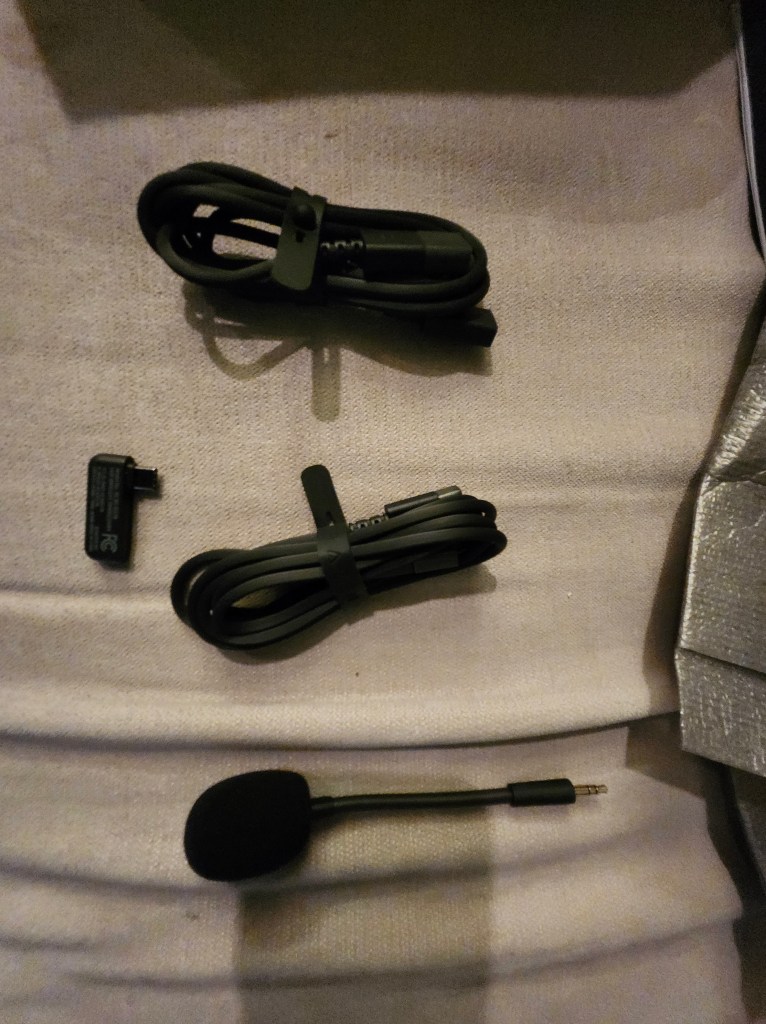
Package contains instruction manual, headsets, mic, dongle, and connection cables for multi-connection. Yes, the photo is upside down, we know.
So, there was a little trick to getting the rest of the items out. You have to fold these two pieces of cardboard and slide them through the slots to unlock.

Battery Life

The battery life is decent, and the headset can operate using either Bluetooth or a jack, which helps conserve battery. While I haven’t fully drained the battery during a single session, it seems sufficient for most gaming needs.

These are the items hidden within the packaging. Without context this looks very questionable.
Items unboxed.

Price and Value

Currently priced at $99 at Target, with additional costs for tax and warranty, the Barracuda X offers fair value. However, a price point of around $80 would be more appropriate given its features. It’s not a plug-and-play device; some setup is required to achieve your preferred settings. This can be even further hit or miss as when using the app to fine tune your experience.

Additional Features

  • App Customization: You can download the app to modify sound settings, with options for Game, Movie, Music, and custom equalizer settings. Gaming mode acts like a do-not-disturb mode, allowing you to focus on your game.
  • Comfort for Glasses Wearers: The material offers a comfortable press, making it suitable for glasses wearers without causing pain.
  • Durability: The headset feels sturdy and of better quality than some other brands, though I wouldn’t recommend testing its durability with a fall.

Final Thoughts

Rating: 4 out of 5.

Overall, the Razer Barracuda X is a solid choice for gamers and tech enthusiasts looking for a versatile, wireless headset. It offers good sound quality for gaming, comfortable design, and multi-platform compatibility. While it may not be ideal for audiophiles or those seeking top-notch microphone quality, it provides a satisfying experience for most users.

So far, there have been no major issues, and I haven’t needed to contact customer support. If you’re in the market for a reliable and affordable wireless headset, the Razer Barracuda X is worth considering.

Looking for something specific or have thoughts to share? Drop a comment below and let us know! We’re all ears for your product inquiries or valuable feedback. Your input helps us serve you better!