Owls Up There with Fed Banking

Quick note: if you’re viewing this via email, come to the site for better viewing. Enjoy!

To be or not to be…poor. That is the question. WAIT, WHY IS THAT EVEN A QUESTION!?
Photo by Andrea Piacquadio, please support by following @pexel.com

Let’s start this off by asking a simple question and this is something that many of you can relate to. How many of you enjoy having a bank account full of money? It’s safe to assume that almost everyone reading this script enjoys having a decent sum of money in their bank account.

I know that there may have been a very, very, very small few that might have said, “Money isn’t real, the real value of you isn’t in the form of numbers.” To them, I ask, if that is true then why is it that every time I get a bill, I spiral into a panic attack? Explain that one, however, you’re not wrong, that’s not the point being made here, so hush.

Suppose like in many situations, you check your account before going to sleep to confirm you have a decent amount, but when waking up you get an alert sounding like the accountant bit from South Park talking about your bank account, “Annnd, it’s gone. Your money, it’s all gone.” Let me script for you how this may have happened.

Dear sweet Satan’s cornhole…Z-Daddy was right. My accounts are at zero.
Photo by Andrea Piacquadio, please support by following @pexel.com

Halloween Gone Mobile

So, the numbers in your bank account are gone with the wind and you’re probably wondering how you got to this junction. Well, let me inform you that you may have been infected with a virus called SOVA.

SOVA is a virus designed for mobile phones, as you can predict this is mainly for Android phones, but iPhone users don’t think you’re safe. Your sweet saucy phone jack is just not on the menu for now.

SOVA, in case you were wondering means owl in Russian, the name was given because owls are nocturnal birds of prey, they’re silent, and like a slow jam from the 80s, they stalk and capture their prey. As you could have already guessed, this is Michael Myers of the animal kingdom, and it very well could be on your mobile device.

I don’t stalk my prey; they just don’t see me coming. Stop making a big woot…oh I saw what you did there.
Photo by Pixabay, please support by following @pexel.com

Night-time Owls, Day-time Collection

Outside of SOVA being given a cute name by the threat actor, the first version made its first appearance on the underground markets back in September of 2021. For those who don’t know what the underground markets are, they’re the “dark web” or may also be called the “dark net”. And before you ask, no, there is not an underground store in either of those areas.

SOVA was shown that it not only had the ability to collect usernames, passwords, and other information, but it also has an interesting function that will be brought up later. Trust me, you’re not going to like this. If you suffer from having trust issues with people, you’re really going to have it with your phone after reading this script.

No, no, no, annnnnnd now it’s gone. All of my money, it’s all gone.
Photo by Karolina Grabowska, please support by following @pexel.com

Intruder at Hand

Right now, you’re probably looking at your phone and thinking “I don’t trust you.” And you would be right since your phone is the main attack vector for this malware/virus/trojan. That’s right, viruses have pronouns too.

SOVA is distributed by a smishing attack, which is another form of phishing where the attacker is trying to bait you into clicking on a link for further malicious intent via text messaging.

Once the fake application is installed on the phone, it then sends the list of all applications installed on your device back to the command-and-control server (C2C), this is done with the intent for the attacker to then choose which app to target.

The attacker fires back the malware that can perform collecting keystrokes, steal cookies, intercept multi-factor authentication tokens, copy and paste, and add fake overlays for a range of apps.

But are you ready to have some major trust issues? This malware can perform actions like clicking, swiping, and pretty much interacting the same way as if you were using it. This is all done via the accessibility service, guessing this is the last time you’ll trust a handicap sign.

All of our accounts are wiped clean, if only we kept reading Scriptingthewhy.
Photo by energepic.com, please support by following @pexel.com

Panic, Pause, and Simple Steps

While this seems like the sky is falling and you’re never going to dance again because empty words have no rhythm. Though it’s easy to pretend, knowing this information will not make you a fool. Always be very careful when you download from a friend as this could be potential harm that you have been given.

A few other ways of preventing from downloading such malware are to make sure you check all of the details of the application such as reviews and how often the application is downloaded. Make sure you download from only trusted sources like the manufacturer’s store or from the app store.

Other practices are making sure your OS (Operating System), applications, and anti-virus software are up to date. Most of the ways to keep your devices and information safe are to follow simple best practices but most of the time the combination of “It’s our app and we want it now” and reading takes too much effort that exposes us to possible threats.

This is my third time this month getting a spa treatment, and it’s all thanks to those cursed scripts. Bless you Z-Daddy.
Photo by John Tekeridis, please support by following @pexel.com

Made it this far and found this to be entertaining? Then a big thanks to you and please show your support by cracking a like, scripting a comment, or plug-in to follow.

Would like to give sincere thanks to current followers and subscribers, your support and actions mean a lot and has a play in the creation of each script.

Do you feel like I may have missed something about SOVA? Script a comment below.

Bombing with Midget Logic

Quick note: if you’re viewing this via email, come to the site for better viewing. Enjoy!

First day on the job. I think it’s time I read the latest script. What could go wrong?
Photo by Andrea Piacquadio, please support by following @pexel.com

It’s your first day on the job as the new System Admin and you can’t wait to take on the day. Congratulations. After meeting with a few of your co-workers and the other people you are going to be helping throughout the building, you grab a cup of that fresh poisonous morning brew and head back to your office.

Quick rant, I swear toilet manufacturers and coffee companies have a secret contract together because there is no logical reason why you should down a cup and have to rush to the bathroom to exercise your sphincter moments later. They are in cahoots, and you can’t tell me otherwise.

Back on track, you’re back at your office sitting at your computer clearing out emails, and responding to tickets, and you notice a file named “Click here, there’s nothing to worry about.” You pause and think, “Maybe there is something to worry about”, you look back only for it to then say “No, really, there’s nothing to worry about. Promise.”

You wrestle with the thought and after a short time of debating you figure just checking the file out couldn’t be any harm, surely nothing could go wrong, you then receive an alert for a countdown. Let me script for you how things are about to blow up.

This is not good, Z-Daddy is ain’t good at all mate. One file is about to have me lose me job, fam.
Photo by Ketut Subiyanto, please support by following @pexel.com

First Day Ticking

There’s a countdown, meaning you’re on a time clock and it’s a race to solve this problem. Relax, this is no cause for panic, you’re just having some first-day bad luck. The event you just triggered with your curiosity is called a “Logic bomb”.

Logic bombs go by other names such as “Slag code” or “Slug code” but the result is still the same. A flavor of bad things happens at the end of the countdown which leads to the involuntary clapping of your cheeks via boss or client.

Logic bombs are malicious code inserted into an application and are designed to go off when the right event has taken place. This isn’t to be confused with “time bombs” as time bombs are a subset of logic bombs.

Time bombs are coded to go off at a specific time. This is like how a typical bomb operates but the only upside is you get to keep all your limbs instead of being either wheelchair or casket bound for the rest of your existence.

Puppy, you stay as cute as you are and I’ll be your John Wick. I have the strange feeling I should looking out for something…oh well, I’ll just read another script.
Photo by Pixaby, please support by following @pexel.com

Coded Bombs Outsourced

What kind of person would leave you with such a treat for your first day on the job? Well, if you could recall how your now boss felt about the previous Sys Admin, you might have thought that it could’ve been him. But before any confirmation of them being the culprit here’s a brief history on logic bombs.

The history of Logic Bombs dates to the Cold War, you know, that good ole USA vs USSR. The CIA (Central Intelligence Agency) had launched a trojan horse- that was in code, they didn’t actually launch a trojan horse, on the Soviet Union back in 1982. This was widely considered to be the original use of the logic bomb.

In the event of a logic Bomb being launched, a trucking company had some dealings with a software contractor, leading to a disagreement. Following that disagreement was the threat of using a logic bomb unless the client paid the invoices.

This had gone to court and the client won. Finally, this great-at-outsourcing country, the USA was on the receiving end of a logic bomb. Our army found that significant amounts of data were deleted which led to reservists being delayed for deployment and in payment. The Army was able to restore the data after coughing up $2.5 million for an investigation and repairing systems.  

How does any of this relate to your situation? Well, the previous Sys Admin might have been unhappy, and this is the kill from beyond the grave. You just happened to be the tool to set things in motion. Also, the individual that launched the logic bomb received jail time and had to pay $1.5 million in restitution. United States of America baby, we love our bills.

Enjoy the read so far? Why don’t you consider subscribing so you can keep up to date?

Don’t worry kid, logic bombs aren’t the only thing we sell here. How about you turn around? You could get a trick and a treat.
Photo by Nadin Sh, please support by following @pexel.com

High Level and Too Close

How could the previous Sys Admin be the culprit you might be wondering. The design of a logic bomb depends on the one creating it and what their goals are. They’re usually created by someone with high-level access, granting them the ability to have many options as to where the bomb or bombs could be placed.

Being able to dress them as viruses, malware, or worms furthers an already growing attack vector list and can make it even harder to trace the origin. As mentioned before, a few conditions could be required for detonation, one being something simple like opening a file. The other could be natural as the payload goes off when a time criterion is met.

The developers’ goals could range from releasing a worm to infect the network, releasing ransomware to extort money from the company, or deletion of files and worse the hard drive. And once the dust settles, the culprit, if clever, is long gone as this could have been left months or even a year behind.

Pay my employees? How? My company makes money hand over fit.
Photo by Lukas, please support by following @pexel.com

Build-A-Bomb Prevention Plan

At this junction, you’re probably wondering how you would be able to catch something like this from going off in your company or simply just avoiding this whole event together. One way to prevent this and I know the majority of companies are going to say, “THAT’S AN OUTRAGE!” Ensuring that the people who are closest to sensitive items and information are paid could help and seeing them paid well could be a huge benefit.

Money doesn’t solve everything but being able to pay your bills on time does help. Other forms of prevention are used up to date antivirus software as the logic bomb might have been injected into a virus or malware, scanning all files from time to time – this includes all compressed files, avoiding clicking on suspicious email attachments like “Nude Cowgirl Midgets” from known and unknown sources, keeping your OS (Operating System) up to date, and training staff not to click on anything promising them a good time. Logic bombs are tricky by design but with a watchful eye, you might be able to spot one in time and stop yourself from…well, exploding.

Like, share, and subscribe…in Scriptingthewhy we trust. America baby!
Photo by Pixabay, please support by following @pexel.com

Made it this far and found this to be entertaining? Then a big thanks to you and please show your support by cracking a like, scripting a comment, or plug-in to follow.

Would like to give sincere thanks to current followers and subscribers, your support and actions mean a lot and has a play in the creation of each script.

Have your company or someone you know experienced a logic bomb event? Feel like there’s something I may have missed? Script a comment below.

Read Before Deleting, Here’s Why…

It’s a new browser I’m trying out. I think it’s Jangoram or something like that.
Photo by Mikhail Nilov, please support by following @pexel.com

Would You Look at That?

You know since the internet has been around, the threats we come across or face daily are unreal. We run the risk of catching all types of viruses, worms, malware, feelings…. well, not that last one. Feelings are dependent on what site you frequently visit, and if you pay attention to your downloads. If you don’t, you might not be alone tonight.

Now, while we are knowledgeable about some of the risks on the internet, there comes a time when we have to say “Uh, I don’t know. I’ve never seen that before, but we’ll look into it.” This is followed by someone being an adult and saying, “That’s what she said.” Real mature Eric, grow up—the joyful world of having coworkers.

However, back to the point, recently someone reached out to us to help get their computer back to normal. When they showed what was on their computer we said “Uh…holy smokes Batman, we don’t know that malware, to the Bat cave.” So, today we’re going look at what this malware is, what some of its functionalities are, and how you can remove it off your system should you be so unlucky to cross it.  

Like what you’re reading so far? Consider subscribing for more.

We’ve never seen this before. What would Batman and Robin do?
Photo by Mikhail Nilov, please support by following @pexel.com

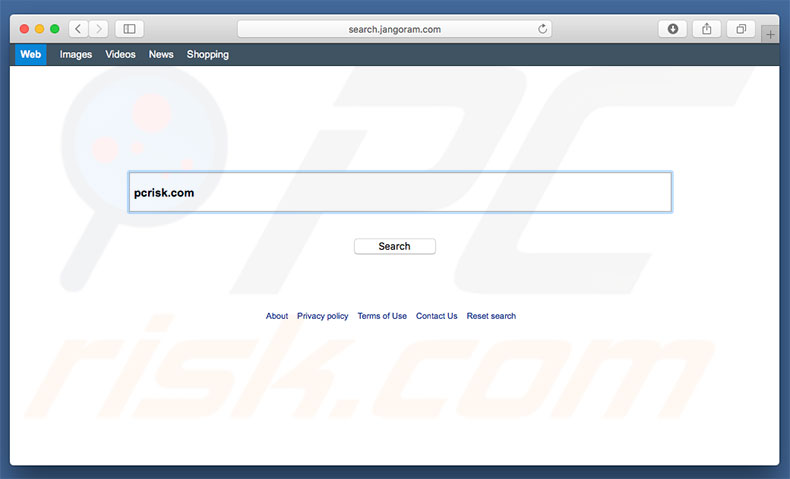
In today’s script, look no further than the malware called “Jangoram.” Jangoram is a browser-based malware that hijacks the current browser and replaces it with what seems to be a search engine. This malware does not come alone, once it’s downloaded, it then brings onboard other free software from the internet.

If your browser looks like this, don’t use it.
Photo credit by pcrisk.com

Hijacking browsers, how are they a problem? Well, that’s a good question reader, glad you asked. They’re a problem because while you’re using them instead of your actual browser, you run the risk of having what are called “Pups” installed onto your machine. No, you’re not installing puppies, PUPs are “Possibly Unwanted Programs”. If you look at your list of applications and see one you’re not familiar with, then you may have a PUP.

How do you get them removed you ask? Simple, by moving them to the trash and deleting them forever. If it’s on Windows, then you may have to uninstall them. Other issues that could arise are but are not limited to; adware, drive-by downloads, and in some cases being redirected to other sites.

A good way to picture this headache, try walking to your kitchen for a sandwich only to find yourself in a hedge maze with salesmen.

Don’t panic, there’s a fix to this kid.
Photo by Keira Burton, please support by following @pexel.com

You have this on your computer, and you’re panicked, what should you do? Well, calm down, we have good news. Now, while this is malware, and has been known to be tough to remove sometimes. This would not be one of them.

A simple way, and the one with less amount of steps, is to have updated anti-virus software in place to perform scanning and removal. Since other methods can be lengthy and involve you diving into files and applications, we’re going to leave a link, click here.

Another bit of good news is this malware threat level isn’t high and someone less tech-savvy can resolve this issue. So, if you think of it, it’s so easy a caveman could do it.

If you have made it this far and found this to be informative/entertaining then consider a like, sharing, and subscribing so you can keep up-to-date.