Is Apple’s Closed Ecosystem Worth the Trade-Offs?

Key Takeaways

  • Apple’s Closed Ecosystem: Provides enhanced security but can limit user flexibility and control.
  • Security Concerns: While Apple offers strong security measures, user error and targeted attacks remain potential threats.
  • Lack of Upgradeability: Newer Apple devices, especially MacBooks, offer limited upgrade options, reducing their lifespan and forcing users to purchase new devices.
  • Balancing Act: Apple should strive to balance security, user experience, and innovation.
  • Informed Choices: Users should carefully consider the trade-offs between security, convenience, and cost when choosing Apple products.

Image generated with AI. Apple is just one of those Knights. Also, this knight is missing fingers. AI isn’t taking anyone’s job.

Apple: A Double-Edged Sword of Security and Convenience

Apple products have long been hailed as the pinnacle of technological innovation and security. However, a closer look reveals a more nuanced picture. While Apple’s closed ecosystem undoubtedly offers a higher level of security compared to its open-source counterparts, it also comes with significant drawbacks.

The Security Dilemma: A Double-Edged Sword

One of the primary reasons people choose Apple is its robust security measures. The closed ecosystem limits access to the device’s core components, making it more difficult for malicious actors to exploit vulnerabilities. However, this security-focused approach can sometimes hinder user experience. For instance, recovering a lost or forgotten Apple ID password can be a frustrating ordeal.

Moreover, it’s important to remember that no system is entirely impenetrable. Even Apple devices can fall victim to targeted attacks and user error. The old adage, “The weakest link in the chain is often the user,” still holds true.

The Upgradeability Conundrum: A Step Backwards

One of the most significant criticisms leveled against modern Apple devices, particularly MacBooks, is their lack of upgradeability. While older models allowed users to customize their hardware by upgrading RAM and storage, newer models have adopted a more restrictive approach. This decision, while likely driven by cost and design considerations, limits the device’s lifespan and forces users to purchase entirely new machines when their needs change.

Image generated with AI. “I have an iproduct, I don’t have to worry about safety.”

A Balancing Act: Security, Convenience, and Innovation

Apple’s commitment to security is commendable, but it should not come at the expense of user experience and innovation. A balance must be struck between these competing priorities. By offering more flexibility and customization options, Apple could empower users to make informed choices about their devices without sacrificing security.

Ultimately, the decision to choose an Apple product is a personal one. While they offer a premium experience, it’s essential to weigh the benefits against the drawbacks. As technology continues to evolve, it’s crucial to stay informed and make informed choices.

What are your thoughts on Apple’s approach to security and upgradeability? Share your experiences and opinions in the comments below.

Love learning tech? Join our community of passionate minds! Share your knowledge, ask questions, and grow together. Like, comment, and subscribe to fuel the movement!

Don’t forget to share.

Every Second Counts. Help our website grow and reach more people in need. Donate today to make a difference!

One-Time
Monthly
Yearly

Make a one-time donation

Make a monthly donation

Make a yearly donation

Choose an amount

$5.00
$15.00
$100.00
$5.00
$15.00
$100.00
$5.00
$15.00
$100.00

Or enter a custom amount

$

Your contribution is appreciated.

Your contribution is appreciated.

Your contribution is appreciated.

DonateDonate monthlyDonate yearly

Razer Barracuda X Review: Multi-Platform Wireless Gaming Headset

Wireless Multi-Platform Gaming and Mobile Headset

Price: $99, $105 tax(depending on area), and $125 if purchased with warranty.

The Razer Barracuda X is a wireless headset designed for gamers and tech enthusiasts, offering a blend of comfort, decent sound quality, and impressive versatility. Here’s a detailed look at its features and performance:

Sound Quality

The overall sound quality is good for gaming, keeping you immersed in your game for longer periods. However, there can be occasional static popping, likely due to game issues rather than the headset itself. For casual music listening, these headsets might not be the best choice as they often bleed music significantly. Also, controlling sound is on done with a scrolling wheel behind the left ear. Might not be a issue for most users however, I am lazy and we’re in the year 2024. I shouldn’t have to work.

Comfort and Design

The headphones cover the entire ear, providing a noise-cancellation feel without weighing down your experience, even during long gaming sessions. The design is comfortable, making it suitable for extended use.

Microphone Quality

The microphone quality is adequate, though not groundbreaking. It gets the job done for in-game communication and voice calls.

Connectivity

One of the standout features of the Barracuda X is its ability to connect to multiple devices using a dongle. This makes it a great choice for gamers who use various gaming consoles. However, the initial setup can be a bit tricky, especially for Xbox users. Bluetooth connectivity works as expected, with a slight wait time before you can start gaming.

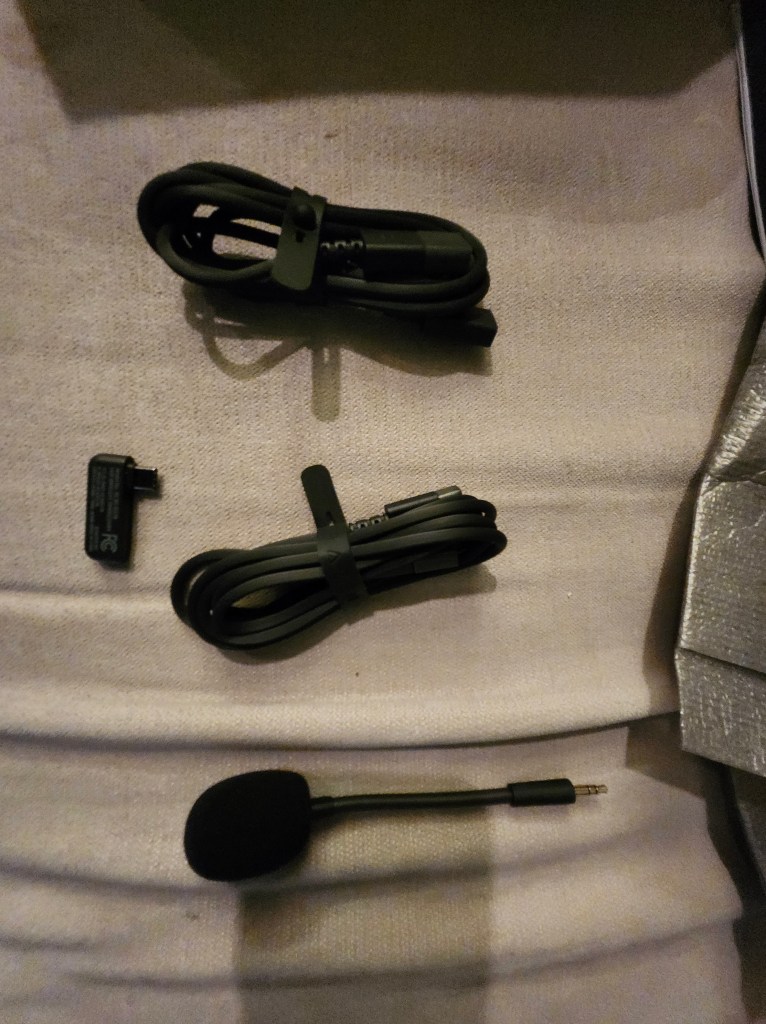
Package contains instruction manual, headsets, mic, dongle, and connection cables for multi-connection. Yes, the photo is upside down, we know.
So, there was a little trick to getting the rest of the items out. You have to fold these two pieces of cardboard and slide them through the slots to unlock.

Battery Life

The battery life is decent, and the headset can operate using either Bluetooth or a jack, which helps conserve battery. While I haven’t fully drained the battery during a single session, it seems sufficient for most gaming needs.

These are the items hidden within the packaging. Without context this looks very questionable.
Items unboxed.

Price and Value

Currently priced at $99 at Target, with additional costs for tax and warranty, the Barracuda X offers fair value. However, a price point of around $80 would be more appropriate given its features. It’s not a plug-and-play device; some setup is required to achieve your preferred settings. This can be even further hit or miss as when using the app to fine tune your experience.

Additional Features

  • App Customization: You can download the app to modify sound settings, with options for Game, Movie, Music, and custom equalizer settings. Gaming mode acts like a do-not-disturb mode, allowing you to focus on your game.
  • Comfort for Glasses Wearers: The material offers a comfortable press, making it suitable for glasses wearers without causing pain.
  • Durability: The headset feels sturdy and of better quality than some other brands, though I wouldn’t recommend testing its durability with a fall.

Final Thoughts

Rating: 4 out of 5.

Overall, the Razer Barracuda X is a solid choice for gamers and tech enthusiasts looking for a versatile, wireless headset. It offers good sound quality for gaming, comfortable design, and multi-platform compatibility. While it may not be ideal for audiophiles or those seeking top-notch microphone quality, it provides a satisfying experience for most users.

So far, there have been no major issues, and I haven’t needed to contact customer support. If you’re in the market for a reliable and affordable wireless headset, the Razer Barracuda X is worth considering.

Looking for something specific or have thoughts to share? Drop a comment below and let us know! We’re all ears for your product inquiries or valuable feedback. Your input helps us serve you better!